Webhook Auto Deploy
Overview
A standard deploy configuration can expose a webhook so that pushing code or a tag automatically creates and runs a deploy request. Gitee, GitHub, GitLab, Gogs, Coding and Codeup (Alibaba Cloud) are supported.
Setup
-
On the
Deployment / Deploy Configspage expand the application and click Webhook on the deploy configuration.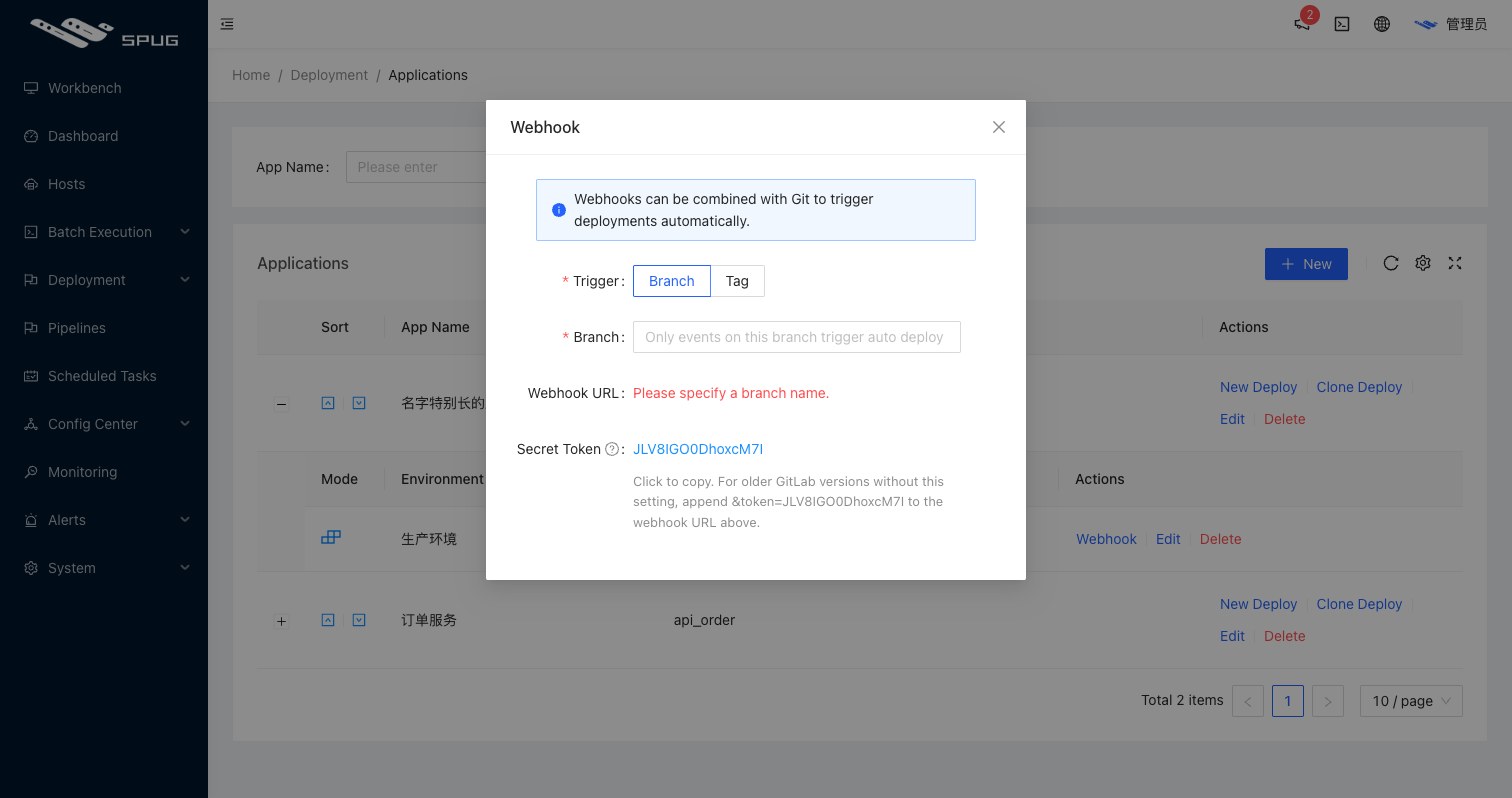
-
Choose the trigger:
Branch: pick a branch; every push to it triggers a deploy of the latest commit. The generated webhook URL carries the branch as itsnameparameter, so pushes to other branches are ignored;Tag: every new tag triggers a deploy of that tag.
-
Copy the generated Webhook URL and Secret Token.
-
Add a webhook in the repository settings of your Git hosting platform:
- URL: the copied Webhook URL;
- secret: the Secret Token (called WebHook password on Gitee, secret text on Gogs, Secret on GitHub, Secret Token on GitLab);
- events:
Push(orTag Pushfor the tag trigger).
-
Push a commit to test. A request of type
Webhookappears under Deploy requests with the first 20 characters of the commit message as its title (the tag name for tag triggers).
- Platforms without a secret setting, such as old GitLab versions, can append
&token=<Secret Token>to the Webhook URL instead. - When the deploy configuration has review enabled, the webhook only creates a request in the
pending reviewstate; both the build and the deploy wait for approval and a manual start. - The Git hosting platform must be able to reach
Spug; for internal deployments expose the/api/apis/deploy/path through a public proxy.
Request verification
Spug identifies the platform by request header and verifies the Secret Token:
| Platform | Header | Verification |
|---|---|---|
| GitLab | X-Gitlab-Token | plain comparison with the Secret Token |
| Gitee | X-Gitee-Token | plain comparison with the Secret Token |
| Codeup | X-Codeup-Token | plain comparison with the Secret Token |
| Gogs | X-Gogs-Signature | HMAC-SHA256 signature |
| GitHub | X-Hub-Signature-256 | HMAC-SHA256 signature |
| Coding | X-Coding-Signature | HMAC-SHA1 signature |
Your own CI system can call the webhook directly (branch trigger: POST /api/apis/deploy/<deploy config ID>/branch/?name=<branch>&token=<Secret Token>; tag trigger: POST /api/apis/deploy/<deploy config ID>/tag/?token=<Secret Token>) with a body that follows any of the formats above and carries ref and the commit information.
See the blog post Webhook auto deploy for a walkthrough.