API
Overview
The configuration center exposes an open API that returns the configuration of an application in a given environment.
Rules
The result is composed from:
- all values of the application in the environment
- all values of the applications it depends on
- the values of the services it depends on
- only values of the requested environment
Usage
The configuration is fetched over HTTP; two parameter sets are available depending on where the call is made.
Inside deploy hooks
-
URL:
/api/apis/config/ -
Method:
GET -
Parameters:
Name Type Required Default Example Description apiToken string yes $SPUG_API_TOKEN fixed value, a built-in global variable that only exists inside deploy hooks format string no kv json output format: kv,envorjson, i.e.key = value,key=valueor{"key": "value"}noPrefix string no 1 by default keys are prefixed with the application or service identifier to avoid collisions; pass this parameter to disable the prefix -
Example
The screenshot below calls the API in
Before deploy on hostand stores the values of the application in a.envfile.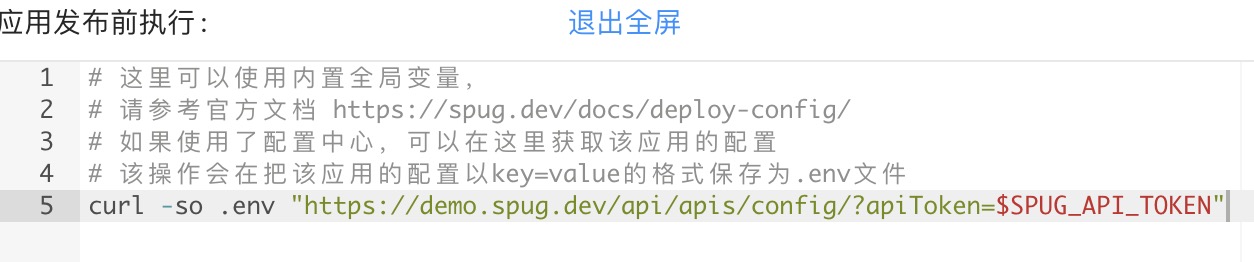
During builds and deployments the values are also injected as environment variables named _SPUG_ plus the upper-cased <identifier>_<key>, e.g. _SPUG_API_ORDER_DB_HOST, so hooks can use them without calling the API; run env | grep _SPUG_ to list them.
Standalone
-
URL:
/api/apis/config/ -
Method:
GET -
Parameters:
Name Type Required Default Example Description apiKey string yes JLV8IGO0DhoxcM7I the access token configured under System / Settings / Open Service Settings; keep it secretapp string yes order identifier of the application (shown on the application pages) env string yes dev identifier of the environment (shown under Config Center / Environments) format string no kv json output format: kv,envorjson, i.e.key = value,key=valueor{"key": "value"}noPrefix string no 1 by default keys are prefixed with the application or service identifier to avoid collisions; pass this parameter to disable the prefix -
Example 1
curl "https://demo.spug.cc/api/apis/config/?apiKey=JLV8IGO0DhoxcM7I&app=order&env=test"Output:
db_order_database = orderdb_order_host = 172.26.89.90db_order_password = 123456db_order_port = 3306db_order_username = rootorder_app_debug = trueorder_cache_driver = fileorder_url = http://test-order.internal.comredis_host = 127.0.0.1redis_password = 123456 -
Example 2
curl "https://demo.spug.cc/api/apis/config/?apiKey=JLV8IGO0DhoxcM7I&app=order&env=test&noPrefix=1"Output:
app_debug = truecache_driver = filedatabase = orderhost = 127.0.0.1password = 123456port = 3306url = http://test-order.internal.comusername = rootNoteComparing the two outputs shows that in
noPrefixmode thehostandpasswordvalues of theOrder DBservice (identifier db_order) were overwritten by theRedisservice (identifier redis), so two values were lost.
Updating values from deploys
During the server-side stage of standard and custom deploys, exporting a SPUG_SET variable creates or updates a configuration value. The format is app-or-service-identifier:environment-identifier:key=value, for example:
export SPUG_SET="order:prod:release_version=$SPUG_VERSION"
The change is recorded in the configuration history, see Deploy configuration.